


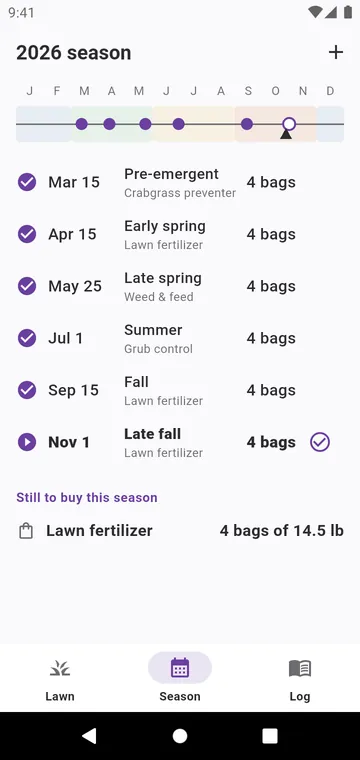
Start from a typical program
Use the typical program sets out the year's steps for your grass. For cool-season grass — fescue, ryegrass, bluegrass —: crabgrass preventer, early spring feeding, weed and feed, grub control, fall feeding and a late fall feeding. For warm-season grass — bermuda, zoysia, St. Augustine —: crabgrass preventer, two feedings, grub control and a fall preventer. Change every date, product and rate, or Add a step.
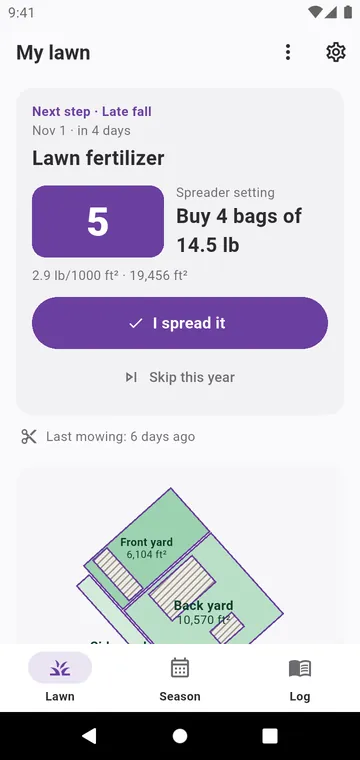
Today on My lawn
My lawn shows the next step: the spreader setting, the bags to buy, and I spread it once it is done. Remind me that morning sends a notification on the day, with the product, the number of bags and your spreader setting. Skip this year leaves a step for next year; Undo skip brings it back.
Your grass, your hemisphere
The Grass type and the Hemisphere are in the settings. In the southern hemisphere, the dates shift by six months. When you create the program, a step you missed less than three weeks ago is offered right away; one that passed longer ago starts next year. Season lists the year's steps and what is left to buy.